New in Time Stream: Organize your tasks smarter with collections and views
If you use Time Stream regularly, you already know that the Tasks page is where planning comes to life. It's where ideas become plans, plans become steps, and steps eventually become things you actually get done. But up until now, everything lived in one space—simple, yes, but sometimes not flexible enough for the way real life works. Because real life is rarely one neat list. It's multiple roles, competing priorities, and different areas of life and projects we need to tackle throughout the week.
That's exactly why we introduced task collections and views. To give you structure when you need it, clarity where you need it, and flexibility how you like it. Think of this update as a major upgrade to the way you organise your work, your projects, and even your mental load. Let's dive into what's new, what's possible, and how you can use these updates to build a productivity system that actually fits your life.
Why we created task collections and views
Before task collections and views existed, every task lived in a single space. You could use tags and statuses to help you organize your list, but we thought that wasn't always enough when your life spans multiple areas—work, personal goals, clients, side projects, study, fitness, and more. We didn't want to just give you more tools to manage your tasks. We wanted to give you more headspace, so organizing, prioritizing, and focusing on what truly matters becomes simpler and more intuitive.
Task collections: separate the worlds you're managing
In Time Stream, a task collection is a self-contained workspace. Each collection has its own tasks, its own statuses, and its own views. This separation is intentional, as context switching is one of the most common obstacles to maintaining focus and productivity.
With Collections, you can keep:
Personal tasks separate from client work
Daily habits separate from long-term goals
Creative ideas separate from administrative tasks
Side projects separate from your 9–5 responsibilities
This reduces internal clutter and removes the need to repeatedly decide where tasks belong.
When Collections become especially useful
Collections help when you need to separate different areas of your life or work.
When your week includes varied responsibilities: Collections let you organise tasks by project or type, making it easier to shift focus efficiently throughout the day or week.
If you freelance or work with multiple clients: Each client can have a distinct workspace with its own workflow, giving you clear boundaries and better organisation.
When managing personal goals: Create collections for fitness, financial planning, home projects, routines, or any area that benefits from structured visibility.
When tasks feel overwhelming: Often the challenge isn't the volume of tasks but the fact that they are mixed together. Separating them into meaningful collections brings clarity and makes the workload easier to navigate.
Views: see your tasks from different angles
While Collections help separate the different areas of your life and work, Views give you the flexibility to see the same tasks in the way that best fits what you're doing at any moment. Every collection can have multiple views, and each view shows the same set of tasks—unless you add filters—but organized differently. This allows you to adjust how you interact with your tasks depending on the context, without ever duplicating or moving them.
In Time Stream, you can create views with three different types of layouts:
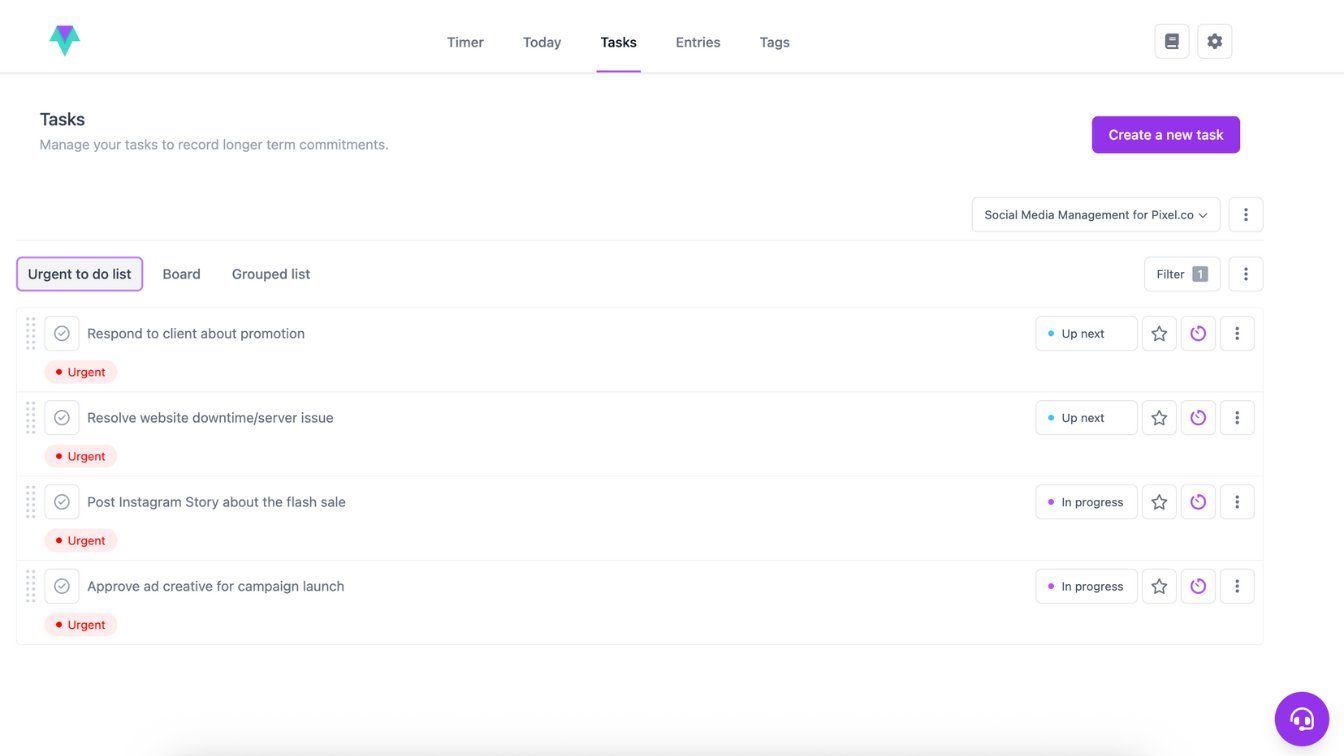
Simple list view: A clean, straightforward list that lets you scan all tasks quickly and efficiently.
A straightforward list of individual tasks to check off one by one.
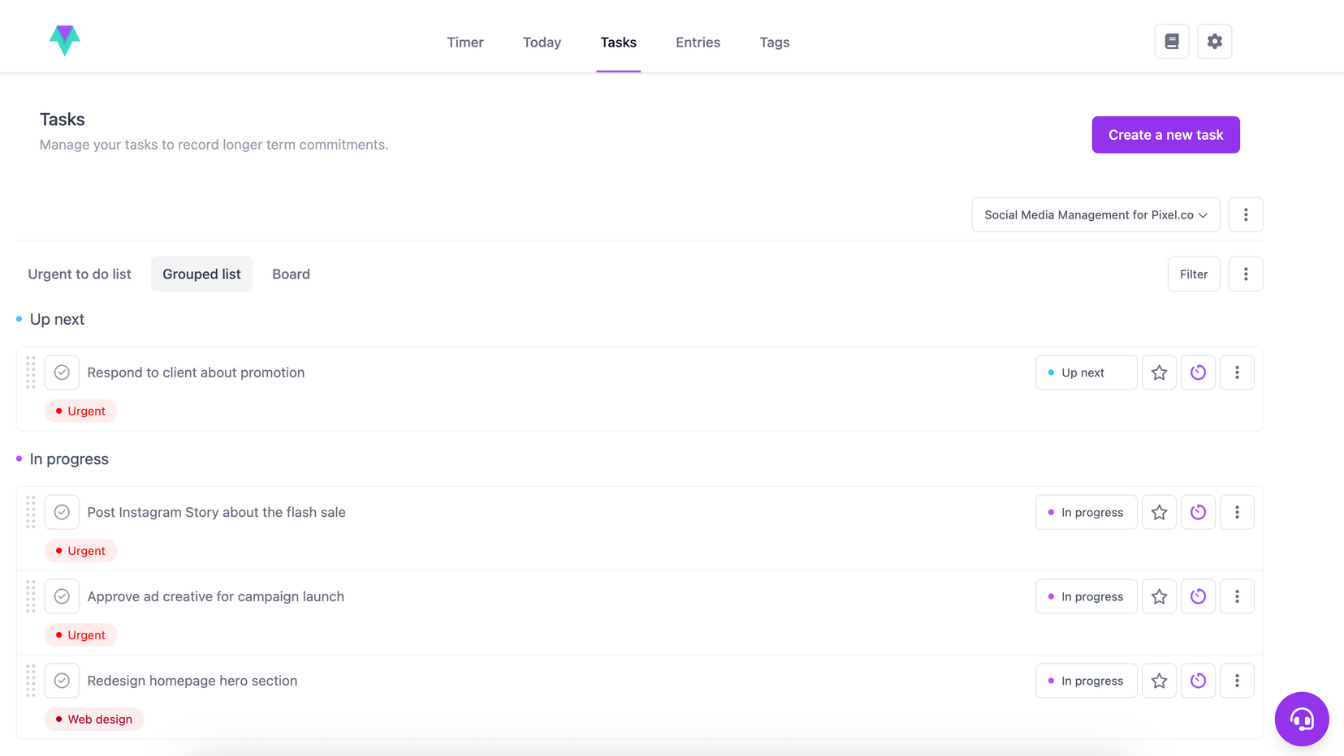
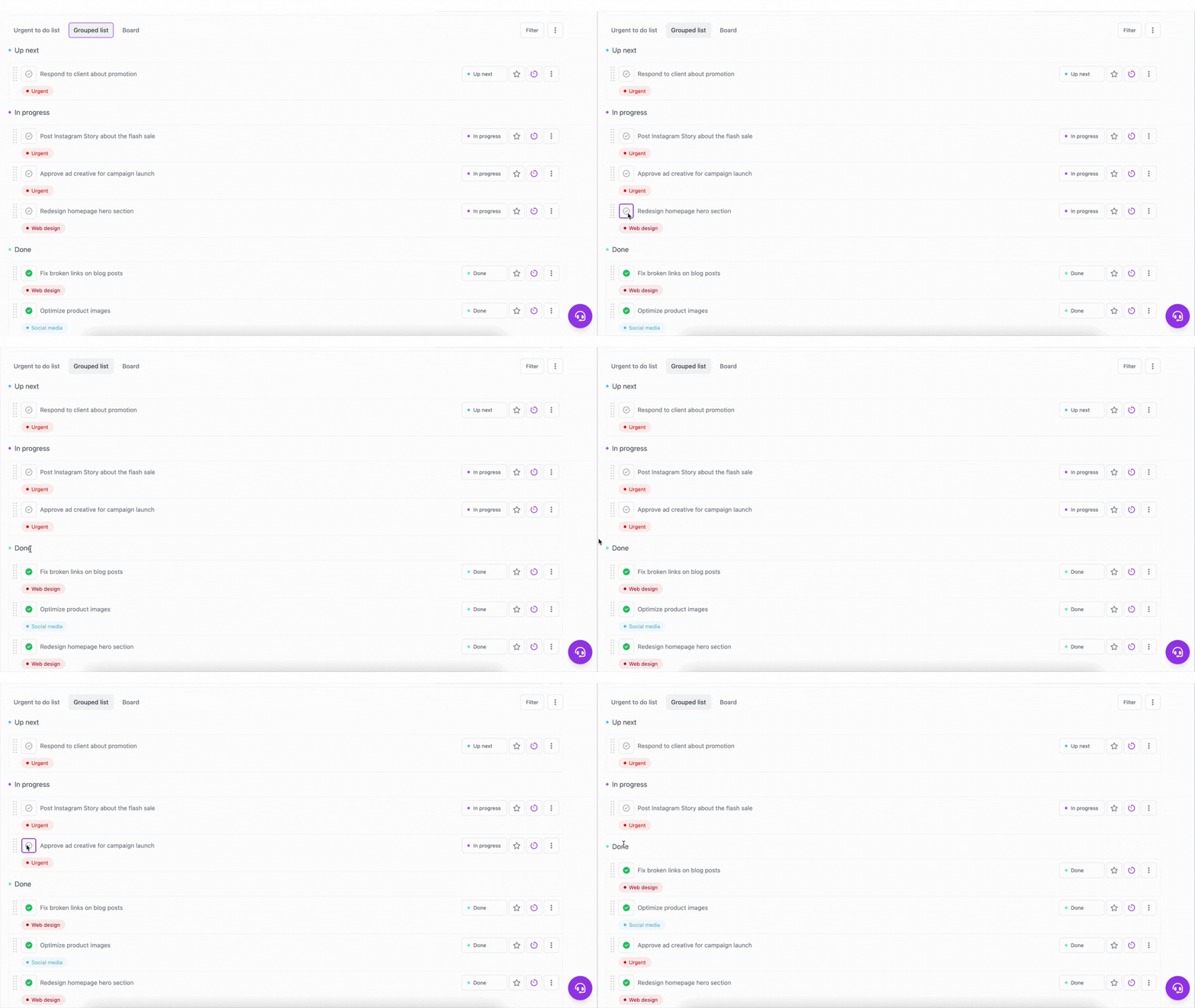
Grouped list by status: Tasks organised by their current status, giving you a clear overview of progress and priorities at a glance.
Tasks grouped by their current status so you can see what's pending, in progress, or completed.
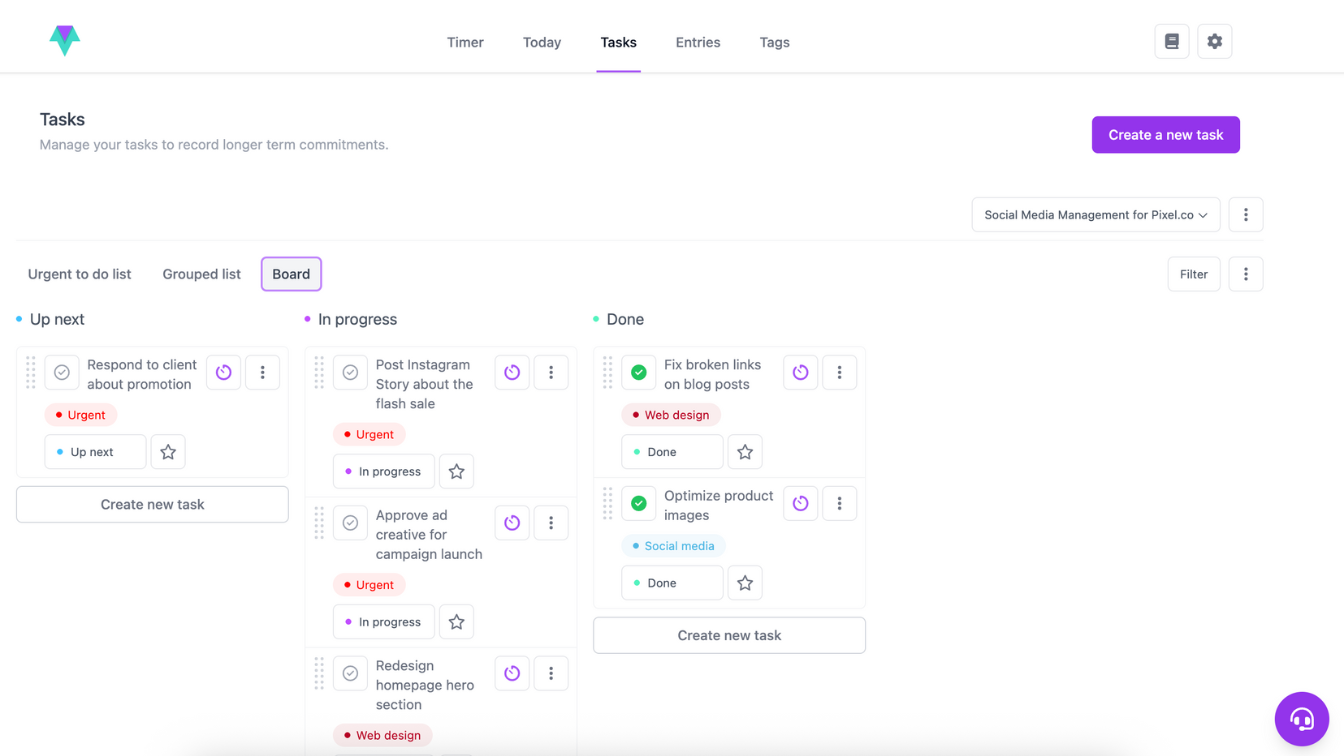
Kanban board view: Tasks displayed as cards that can be moved between stages, providing a visual way to track work and flow.
Tasks displayed as cards that move through stages like To Do, In Progress, and Done.
Each view can also be filtered to show only the tasks you want to focus on. For example, you might create a view that shows only tasks tagged "Urgent" or tasks associated with a specific category. Filters give you the ability to narrow your focus without changing the underlying task list, so you can quickly see what's most important in any given moment.
Why multiple views matter
The way you plan, review, and execute tasks often changes depending on the context. Views let you adapt to that naturally. You might use the simple list when you just want a straightforward overview, the grouped list to check progress across statuses, or the Kanban board to visualise your workflow. Combined with filters, views allow you to focus on what matters most at any given time, whether that's a specific tag, a type of task, or a particular workflow stage.
By providing multiple ways to display the same tasks, Time Stream ensures that your system works with your process, rather than forcing you to adjust your process. You can shift perspectives, adjust focus, and manage tasks in a way that makes sense for the work at hand, creating a more organised and efficient workflow.
How tasks work in the upgraded system
Tasks remain the foundation of your workflow, but now they live inside collections and can appear across multiple views. They also include several practical improvements to help you manage work more efficiently.
Quick timer switching
Each task displays a small icon for either the Pomodoro or Infinite timer. Clicking the icon toggles between timers instantly. When you start that task from the Today screen, the timer will use the appropriate timer type.
Today list integration
Click the star to add any task to your Today view. This allows your Today list to act like a curated, intentional “what I'm focusing on right now” list.
Marking tasks as complete
Tasks adopt the statuses of the collection they belong to, allowing you to create custom workflows for each area of your life. If you assign a status (such as Done) to the Complete category, you can mark a task as finished by clicking the tick to the left of the task description to instantly update the task's status.
Tick tasks to mark them complete within their workflow.
Why this matters: the productivity principles behind these features
This update is more than just a new interface—it's designed around research into how people think, work, and maintain focus. Each feature in Time Stream reflects principles that help make work clearer, more manageable, and easier to act on.
1. Context switching reduces efficiency
By organising tasks into Collections, you minimise unnecessary mental switching between unrelated areas of work. Your brain doesn't need to juggle multiple worlds at once, which allows you to focus on what matters in the moment.
2. Different views support different modes of thinking
Planning, executing, and reviewing tasks each engage different cognitive processes. Views let you adapt how you see the same tasks depending on the mental state you need—whether it's mapping out your work, concentrating on immediate priorities, or reflecting on progress.
3. Clarity encourages action
When tasks are clearly organised, filtered, and displayed in the right context, it becomes easier to start and maintain momentum. You can see exactly where each task belongs, reducing uncertainty and the friction that often leads to procrastination.
4. Visual workflows make progress tangible
Different ways of viewing tasks—whether through Kanban boards, grouped lists, or simple linear lists—help make progress visible. This structure not only reduces overwhelm but also makes managing work feel more intuitive. By providing multiple perspectives on the same tasks, your system becomes easier to use, helping you stay engaged and productive.
Final thoughts
Time Stream's task collections and views are designed to align with the way people naturally think and work. They give you flexibility, clarity, and structure, allowing the same tasks to be managed in different contexts without duplication or unnecessary friction.
By separating tasks into meaningful areas, displaying them in multiple ways, and providing simple ways to focus on what matters, the system reduces mental load, supports productivity, and helps you maintain momentum across all areas of life.
Ultimately, these features are about making your workflow work for you—so you can move from planning to execution with confidence, clarity, and control. And if you haven't already done so, start your free 14-day trial with Time Stream now.
More from the blog
Find your flow, take your productivity to the next level.
When you think of staying focused at work, quick fixes like coffee, a quiet work space, or a neat to-do list might be the first things that come to mind—but one of the most powerful tools often goes unnoticed: movement. In this blog, we’ll uncover how incorporating even small bursts of physical activity into your day can sharpen focus, boost creativity, and keep your productivity at its peak.
If you’re ready to accomplish more and stress less, it all starts with building the right habits! With the right mindset and tools, it becomes totally achievable. Our new Time Stream blog is your space for practical strategies, actionable tips, and expert insights to help you unlock your productivity potential.
Ever get so immersed in a task that time flies, and you forget to even check your phone? That’s productivity flow—a powerful state of deep focus that can boost your output by up to 500%. In this blog, we’ll explore what flow really is, why it matters, and how you can tap into it more often to work smarter, not harder.
|
5 min
Find your flow. Start using Time Stream today.
The only productivity app that protects your time and privacy. Focus better, accomplish more.